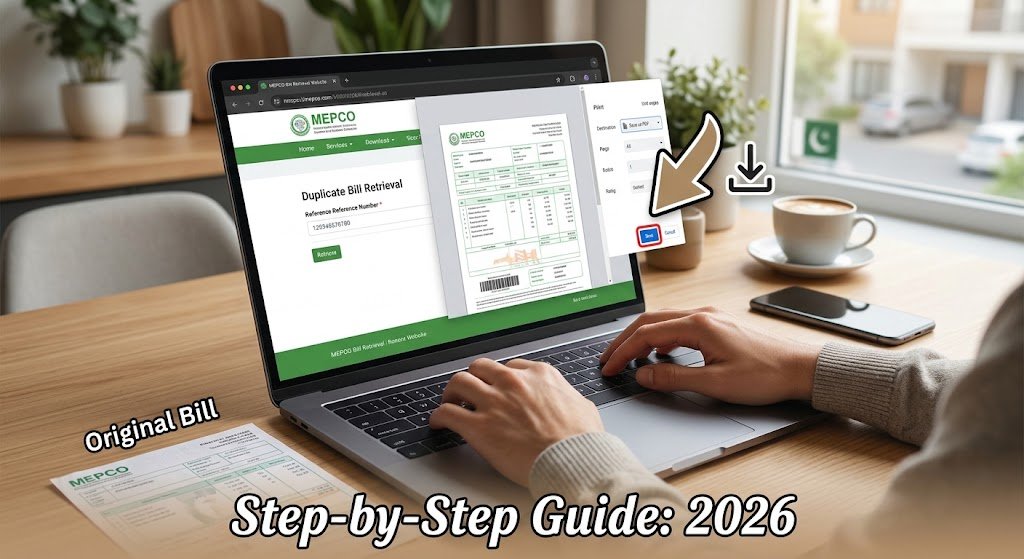
Yes, you can download your MEPCO bill as a PDF — but there is no download button. The official portal shows your bill as a web page, and your own browser turns it into a PDF file using its print menu. It takes about two minutes, costs nothing, and works on any phone or computer.
That one detail is why so many people give up halfway. They search for a download icon that does not exist, screenshot the bill instead, and end up with a blurry image the bank counter refuses to accept.
This guide shows you the real method — separately for Android, iPhone, and desktop — plus the single print setting that decides whether your PDF comes out complete or blank.
What You Need Before You Start
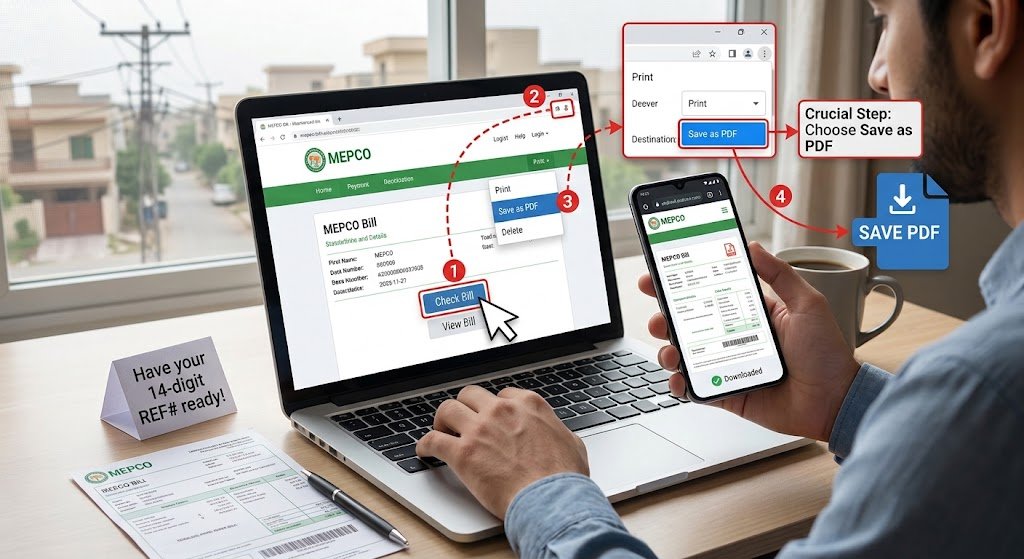
Only one thing: your 14-digit reference number.
You will find it printed in the consumer detail box at the top-left of any old MEPCO paper bill, usually labelled “Reference No”. It is a long unbroken string of digits.
Do not confuse it with the 10-digit Consumer ID, which sits nearby and is used for older billing records. The reference number is what the bill-check tool expects.
Save it once. Your reference number never changes, no matter how many months pass. Type it into your phone’s notes app today and you will never dig through a drawer for an old bill again.
Lost every paper bill? You have three realistic options: ask a neighbour on the same feeder to check their bill for the shared prefix digits, visit your MEPCO sub-division office with your CNIC and meter number, or call the MEPCO helpline. Be aware that the official portal does not support looking up a bill by CNIC alone, whatever other sites may suggest. You can check your MEPCO bill online as soon as you have the number.
How to Download MEPCO Bill in PDF on Android
Most readers are on an Android phone, so start here.
- Open the MEPCO bill check page in Chrome.
- Type your 14-digit reference number into the search box. Enter digits only — no spaces or dashes.
- Tap Check Bill. Your bill opens as a full page.
- Tap the three-dot menu (⋮) at the top-right of Chrome.
- Tap Share, then Print. (On some Android versions, Print appears directly in the three-dot menu.)
- At the top of the print preview, tap the destination dropdown and choose Save as PDF.
- Tap the blue PDF download icon on the right.
- Choose a folder — Downloads is the default — and tap Save.
Your file is now in the Downloads folder. You can find it again through the Files app, or by tapping ⋮ → Downloads in Chrome.
How to Download MEPCO Bill in PDF on iPhone
Safari hides this behind an extra step that catches almost everyone out.
- Open the bill check page in Safari and enter your reference number.
- Tap Check Bill to load your bill.
- Tap the Share icon (the square with an arrow) at the bottom of the screen.
- Scroll down the share sheet and tap Print.
- This is the step people miss: on the print preview, place two fingers on the page thumbnail and pinch outwards to open it full screen. This converts the preview into an actual PDF.
- Tap the Share icon again, then Save to Files.
- Pick On My iPhone or iCloud Drive and tap Save.
On iOS 17 and later there is a shortcut: tap Share → Options at the top of the sheet → select PDF → Save to Files. Same result, fewer taps.
How to Download MEPCO Bill in PDF on a Laptop or PC
- Open the bill check page in Chrome, Edge, or Firefox.
- Enter your 14-digit reference number and click Check Bill.
- Press Ctrl + P on Windows, or Cmd + P on a Mac.
- Under Destination, select Save as PDF.
- Set Layout to Portrait and Paper size to A4.
- Open More settings and tick Background graphics.
- Click Save, name the file something like
MEPCO-Bill-Sep-2026.pdf, and choose where it goes.
Why “Background graphics” matters more than anything else
Leave that box unticked and your browser strips out the shaded table cells, the MEPCO logo, and — critically — the payment barcode.
The file will look almost right on screen. It will be rejected at the bank counter, because the cashier scans that barcode. This single setting is the difference between a usable duplicate bill and a wasted trip.
If you have already saved a PDF that looks pale, washed out, or is missing the barcode strip, just print it again with the box ticked.
How to Print Your MEPCO Bill Directly
The process is identical — you simply choose a different destination.
At step 4 above, instead of Save as PDF, select your printer from the dropdown. Keep A4, Portrait, and Background graphics enabled, then click Print.
A printed duplicate carries the same reference number and the same scannable barcode as the original posted bill, so it is accepted at bank counters, MEPCO offices, and authorised payment agents.
MEPCO Bill PDF Kaise Download Karen — 3 Asaan Steps
- Reference number likhein aur Check Bill dabayein.
- Browser ka menu kholein → Share → Print.
- Destination mein Save as PDF chunein, phir Save dabayein.
Zaroori baat: print settings mein “Background graphics” ka option zaroor on karein, warna barcode PDF mein nahi aayega aur bank counter par bill accept nahi hoga.
Common Problems and How to Fix Them
| Problem | Why it happens | Fix |
|---|---|---|
| “Bill Not Found” | This month’s bill is not generated yet, or a digit is wrong | Re-enter without spaces or dashes; wait 2–3 days after your normal billing date |
| PDF is blank or half a page | Page had not finished loading before you pressed print | Wait for the bill to fully appear, then print again |
| Barcode missing from the PDF | Background graphics was unticked | Re-print with that option enabled |
| Bill looks pale or has no borders | Same cause as above | Re-print with background graphics on |
| Saved the PDF but cannot find it | It went to a non-default folder | Check Downloads in the Files app, or your browser’s download history |
| Only the current month is showing | The live tool displays the latest bill | See MEPCO bill history for older months |
| Page will not load on mobile data | Server load or a network issue | Switch to Wi-Fi, try a different browser, or retry outside peak evening hours |
| Amount looks wrong | Meter reading or slab error | Estimate the correct figure with the MEPCO bill calculator before filing a complaint |
Is a Downloaded PDF Bill Valid for Payment?
Yes. A duplicate bill downloaded from the official system carries the same 14-digit reference number and the same barcode as the copy delivered to your door. It is a genuine bill, not a preview.
That means you can use it to pay at any bank branch, through your bank’s mobile app, at Easypaisa and JazzCash agent shops, or at a MEPCO collection counter.
Two things worth knowing:
- Downloading late does not extend your due date. If you pass the due date printed on the bill, the late payment surcharge applies regardless of when you saved the file.
- Print in colour or greyscale — either is fine. What matters is that the barcode is sharp and unbroken. Avoid printing at reduced scale, since shrinking the page can make the barcode unreadable.
A Note on “MEPCO MIS” and Bill Apps
Many people search for “MEPCO MIS” expecting a consumer login where bills can be downloaded in bulk. It is not that — MIS is an internal, staff-only system, and consumers cannot register for it. Our guide to MEPCO MIS explains the difference.
Similarly, MEPCO does not publish an official consumer bill app. Be cautious with third-party apps that ask for your CNIC, card details, or bank login in exchange for showing your bill. The browser method in this guide needs none of that.
Frequently Asked Questions
Can I download my MEPCO bill using my CNIC?
No. The official MEPCO bill system works on the 14-digit reference number or the 10-digit Consumer ID only. Any site claiming to fetch bills by CNIC alone is either guessing or collecting your data. If you have lost your number, visit your sub-division office with your CNIC and meter number.
How do I download an old MEPCO bill in PDF?
The live bill tool shows your most recent bill. For earlier months, use the MEPCO bill history tool, then save the result using the same print-to-PDF steps described above.
Why is my downloaded MEPCO bill blank?
Almost always because Background graphics was switched off in the print dialog, or because you printed before the page finished loading. Reload the bill, wait for it to display fully, then print again with background graphics enabled.
Is there a fee to download a MEPCO duplicate bill?
No. Viewing, downloading, and printing your MEPCO bill is completely free. You never need to pay for a duplicate bill, and you should never enter card details to obtain one.
Can I download my MEPCO bill from another country?
Yes. The bill portal is accessible worldwide and needs nothing but the reference number, which makes it straightforward for overseas Pakistanis paying for a family home. If a page occasionally fails to load, try a different browser or retry later.
How many months of MEPCO bills can I download?
The current bill is always available, and the history tool covers a rolling window of recent months. For records older than that window, request a printed statement from your MEPCO sub-division office.
Conclusion
Downloading a MEPCO bill as a PDF comes down to three things: have your 14-digit reference number ready, open the bill in your browser, then use Print → Save as PDF. There is no download button and no app to install.
If you remember one setting from this guide, make it Background graphics — that checkbox is what keeps the barcode in your file and keeps your bill payable.
Ready to get your copy?
It takes under two minutes, and it is completely free.
2 thoughts on “How to Download MEPCO Bill in PDF (2026 Step-by-Step Guide)”