
Demand Notice

MEPCO Demand Notice, ENC & New Connection Tracking
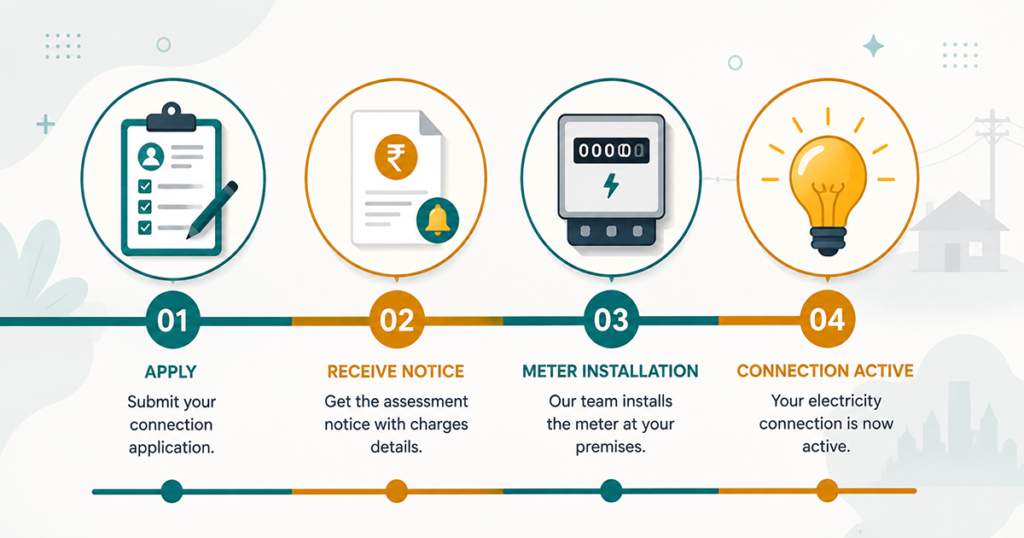
Applying for a new electricity connection with MEPCO involves a specific sequence — application, approval, a demand notice, payment, and finally meter installation. This guide walks through the entire process, explains what a demand notice actually is, and covers how to track your application at every stage, including ENC tracking and new connection status.

What Is a MEPCO Demand Notice?

A MEPCO demand notice is the formal document MEPCO issues once your new connection application has been technically approved. It itemises everything you must pay before your meter is installed and your connection activated, typically including:

  • Security deposit — refundable, varies by consumer category (residential, commercial, industrial) and sanctioned load.
  • Service/processing charges — a one-time fee for application handling.
  • Meter cost — priced according to the meter type assigned (single-phase, three-phase, or industrial/AMI).
  • Line extension or transformer charges, if your property requires additional infrastructure to be connected.

Until this notice is paid, MEPCO will not schedule meter installation — it’s a mandatory gate in the process, not an optional formality.

Understanding ENC (Electronic New Connection) Tracking

ENC refers to MEPCO’s electronic system for processing new connection applications from submission through to activation. Mepco enc tracking lets applicants check where their application currently sits in that pipeline — whether it’s under technical review, awaiting demand notice payment, or scheduled for installation — without needing to visit an office in person for a status update.

How to Check Your MEPCO Demand Notice and New Connection Status

  1. Locate your application or reference number issued at the time you submitted your new connection request.
  2. Access MEPCO’s demand notice or ENC tracking portal and enter the application number (or CNIC, where the system supports it) used during application.
  3. Review the current stage shown: under review, demand notice issued, demand notice paid, installation scheduled, or connection activated.
  4. If a demand notice has been issued, note the total payable amount and the payment deadline shown — demand notices typically carry a validity window, after which the application may need to be revalidated.

Important: If online tracking shows no result, this usually means the application is still in early technical review and hasn’t yet been assigned a trackable demand notice number — check back after a few working days rather than assuming an error.

How to Pay a MEPCO Demand Notice

Once issued, a demand notice can generally be paid through the same channels used for a regular MEPCO bill:

  • Online banking or a bank branch, using the demand notice/application number
  • EasyPaisa or JazzCash, where supported for demand notice payments specifically (confirm the option exists in-app before assuming it works identically to bill payment)
  • Directly at a MEPCO sub-divisional office or authorised collection point

Always retain your payment receipt — it is the proof required to move your application into the installation-scheduling stage, and MEPCO staff will ask for it if there’s any delay in the system reflecting your payment.

How to Print a Demand Notice

If you need a physical copy of your demand notice — for record-keeping, financing, or submission alongside other documents — most tracking portals offer a print or download option once you’ve located your application using its reference number. If the online copy isn’t available, your sub-divisional office can issue a certified copy on request.

Typical New Connection Timeline

While exact timing varies by district, workload, and whether infrastructure upgrades are needed, the general sequence looks like this:

  • Application submission — with CNIC, property proof (ownership or tenancy), and load requirement.
  • Technical feasibility review — MEPCO assesses whether existing infrastructure can support the requested load.
  • Demand notice issuance — itemised charges are generated and communicated to the applicant.
  • Demand notice payment — by the applicant, within the notice’s validity window.
  • Meter installation — scheduled once payment is confirmed; meter type depends on sanctioned load (see our meter-types explainer on the [INTERNAL LINK: / “homepage”]).
  • Connection activation — the account becomes live, and your first bill (with its own new reference number) is generated after the first meter reading.

What to Do If Your Demand Notice Has Expired

Demand notices typically carry a validity period. If yours has lapsed before payment, contact your sub-divisional office directly — in most cases the application can be revalidated rather than restarted from scratch, though this depends on how long it has been since the original technical approval.

Conclusion

A MEPCO demand notice is simply the payment gate between an approved application and an active connection. Track your application’s status through MEPCO’s ENC system using your application number, pay promptly within the validity window, and keep every receipt until your meter is installed and your first bill appears on our “MEPCO online bill check homepage.

Frequently Asked Questions

What is included in a MEPCO demand notice?

Security deposit, service/processing charges, meter cost, and any line extension or transformer charges required for your specific connection.

Use your application or reference number in MEPCO’s ENC tracking system to see whether your application is under review, has an issued demand notice, or is scheduled for installation.

ENC (Electronic New Connection) tracking is MEPCO’s system for monitoring a new connection application’s progress from submission to activation.

Generally no — you need the application or reference number issued when you submitted your request. If you’ve lost it, your sub-divisional office can look up the application using your CNIC and property details.

Validity periods vary; check the specific date printed on your notice, and contact your sub-division promptly if you’re at risk of missing it.

Payment moves your application into the installation-scheduling queue, but the exact installation date depends on your sub-division’s current workload and any infrastructure work required.